Smallpdf
A multi-platform PDF toolkit for document conversion, editing, and management.
- Also known as
- smallpdf
Available worldwide
What is Smallpdf?
Smallpdf is a cloud-based PDF service offering 48 tools for converting, editing, compressing, and managing PDF documents. It's available as web applications, browser extensions, desktop software for Windows and macOS, and mobile apps for iOS and Android, with integrations for Google Workspace and Dropbox.
Smallpdf pricing
Plans, per-tier features and add-ons, dated and linked to live pricing. Pricing changes often; always verify at source before you rely on it.
Freemium model with paid subscription tiers billed annually.
Free
Free30+ document management tools with limited usage
- tools
- 30+
- downloads
- limited
- mobile_access
- limited
- sign_com_limit
- 2 documents/month
- 30+ document management tools
- Limited document downloads
- Limited mobile app access
- Limited Sign.com access
Pro
Unlimited access to all tools, AI features, and premium compression
- Unlimited access to 30+ tools
- Unlimited document downloads
- Edit Text, OCR, and more
- Strong Compression
- Unlimited AI-powered tools
- Unlimited mobile app access
- Unlimited Sign.com Premium subscription
Team
Team collaboration with discounted per-seat pricing and centralized management
- team_size
- 2-19 seats
- Everything in Pro
- Special discounted pricing
- Priority customer support
- Centralized billing
- Member access management
- Unlimited Sign.com Premium for each team member
Business
Contact salesEnterprise solutions for large teams with custom terms
- Everything in Pro for Teams
- Custom pricing
- Flexible payment options
- Dedicated customer support
What Smallpdf does
The capabilities that matter for pdf editors, normalised so it lines up with every alternative. “-” means we haven't confirmed it, not that it's missing.
- Deployment model
- Cloud saas
- Base text and image editing within PDF
- ✓
- Page merging extraction and splitting
- ✓
- OCR optical character recognition scanning
- ✓
- Permanent blackout redaction engine
- ✗
- Password protection and encryption
- ✓
- Interactive form field creation
- ✗
- Digital signature certification enforcement
- ✓
- Microsoft office docx xlsx conversion
- ✓
- File size compression engine
- ✓
- SOC2 type ii
- ✗
- ISO 27001
- ✓
- Pricing model
- Freemium
Platform & deployment
Independently observed- iOS
- macOS
- Web
- Android
- Windows
- Cloud / SaaS
- Hybrid
Integrations (5)
Independently observed- Google Drive
- Dropbox
- Google Chrome
- Google Workspace
- Sign.com
Security & compliance
Independently observed- ISO 27001active
Smallpdf FAQ
Common questions about Smallpdf, answered from independent, dated evidence.
What is Smallpdf?
Smallpdf is a cloud-based PDF service offering 48 tools for converting, editing, compressing, and managing PDF documents. It's available as web applications, browser extensions, desktop software for Windows and macOS, and mobile apps for iOS and Android, with integrations for Google Workspace and Dropbox. It is indexed under PDF Editors.
Source: https://smallpdf.com/
Is Smallpdf free?
Smallpdf offers a free tier, so you can start without paying. Paid plans are also available: Free, Pro, Team and Business. Pricing changes often, so verify at source before relying on it.
Source: https://smallpdf.com/pricing
What platforms does Smallpdf support?
Smallpdf supports the web, Windows, macOS, iOS and Android. Platforms we have not confirmed are simply not listed here rather than ruled out.
Source: https://smallpdf.com/
Can Smallpdf be self-hosted?
Not fully, on what we have confirmed. Smallpdf is offered as cloud / SaaS and hybrid, and a hybrid deployment usually means some components can run on your own infrastructure while the rest stays vendor-hosted. We have not confirmed a completely self-hosted option, so check with the vendor if that is a requirement.
Source: https://smallpdf.com/
What does Smallpdf integrate with?
We have confirmed 5 integrations for Smallpdf, including Google Drive, Dropbox, Google Chrome, Google Workspace and Sign.com. This is what we could verify from public sources, so the vendor may support others we have not indexed.
Source: https://smallpdf.com/
What security certifications does Smallpdf have?
We have independently confirmed ISO 27001 and GDPR for Smallpdf. Certifications we do not list are ones we have not been able to verify from public sources, which is not the same as Smallpdf not holding them. Always confirm compliance directly before you rely on it.
Source: https://smallpdf.com/
Where is Smallpdf available?
Smallpdf is available worldwide. The vendor is headquartered in Switzerland.
Source: https://smallpdf.com/pricing
Smallpdf alternatives
Other pdf editors we track, ranked by the same independent score.
- Foxit PDF EditorProfessional PDF editing and document management software with AI-powered features for creation, collaboration, and digital workflowsmedium · 73%
- iLovePDFA comprehensive cloud-based platform for PDF document processing and managementmedium · 73%
- Stirling-PDFOpen-source PDF editor with tools for editing, signing, and bulk processing on any infrastructuremedium · 67%
- PyMuPDFA fast Python library for extracting data from and modifying PDF documentsmedium · 63%
- Nitro ProCloud and desktop PDF editor with eSignature capabilities for document creation, editing, and digital signing workflowsmedium · 55%
- pdf-libA JavaScript library for creating and modifying PDF documents with font and form field supportlow · 44%
Compare Smallpdf
Side by side against other pdf editors, attribute by attribute, with a source on every value.
The vioscaleAI score: one lens on the evidence
Not user reviews and not a paid placement: a confidence-weighted blend of the independent signals below (adoption, activity, security posture, and more), which you can sort and re-weight yourself. Vendors can correct their listing but can never move their rank, and stars are weighted low as a vanity metric. It is one way to read the evidence for Smallpdf, not the verdict.
| Signal | Score | Weight | Contribution | Evidence |
|---|---|---|---|---|
| Price level | 80 | 0.05 | 4.2 | ✓ |
| Capabilities | 92 | 0.04 | 3.6 | ✓ |
| Pricing transparency | 25 | 0.08 | 2.1 | ✓ |
| Security posture | 30 | 0.06 | 1.9 | ✓ |
| Integrations | 17 | 0.05 | 0.8 | ✓ |
| Reliability | 0 | 0.06 | 0.0 | - |
Computed . Re-weight it by intent, or see the full method.
All data & sourcesshow ↓
Every value we hold, with its source, retrieval date, and confidence. This is the evidence behind the score: don't trust it, verify it.
Content
| Attribute | Value | Evidence |
|---|---|---|
| Faq | 7 items | mediumsource · 2026-09-10 · 62% |
Features
| Attribute | Value | Evidence |
|---|---|---|
| Capabilities | Iso 27001: Yes · Soc2 type ii: No · Pricing model: freemium · Deployment model: cloud_saas · File size compression engine: Yes · Interactive form field creation: No | mediumsource · 2026-09-09 · 60% |
Integrations
| Attribute | Value | Evidence |
|---|---|---|
| Count | 3 | mediumsource · 2026-09-09 · 60% |
Market
| Attribute | Value | Evidence |
|---|---|---|
| Availability | HqCountry: CH · PrimaryMarkets: … · AvailabilityScope: global · AvailableCountries: … · NotAvailableCountries: … | highsource · 2026-08-25 · 75% |
Pricing
Security
Is Smallpdf the right choice for you?
Tell us the job, the constraints and what you weigh most, and we will rank Smallpdf against the rest of the pdf editors we index, using the same dated evidence weighted your way.
Free to run, no account needed to start. How the evaluation works
Is this your product?
This profile was built from public sources without asking you. You can take the badge below and use it anywhere, and you can claim the profile to correct anything we got wrong. Both are free, and neither moves Smallpdf up or down: nobody can buy rank here, including you.
Take the badge
Live, always current, and free to use on your own site. It shows Smallpdf's independent score and links back to this profile.
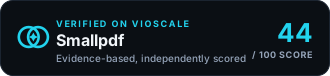
<a href="https://www.vioscale.ai/software/smallpdf" target="_blank" rel="noopener">
  <img src="https://www.vioscale.ai/badge/software/smallpdf.svg" alt="Smallpdf, verified on vioscaleAI" width="330" height="76" loading="lazy" />
</a>
Markdown, for a README →
[](https://www.vioscale.ai/software/smallpdf)Claim the profile
Verify you control the domain, then point us at the pages that state the facts about Smallpdf and add your own description and media. Free, and it does not change the score.
- Correct anything wrong, with evidence
- Point our crawler at the pages that matter
- Write your own description and add media
Not the owner? How vendor profiles work