Screencastify
Browser-based screen recording tool for creating, editing, and sharing videos with teams and audiences
- Also known as
- screencastify
Available worldwide
What is Screencastify?
A cloud-based video recording platform that lets users capture screen and webcam content, apply AI-powered editing and enhancements, add captions and translations, and share with interactive elements like quizzes and questions.
Screencastify pricing
Plans, per-tier features and add-ons, dated and linked to live pricing. Pricing changes often; always verify at source before you rely on it.
From $7/user/month billed annually. Free tier available.
Free
FreeCreate and share videos with essential recording and sharing tools
- bonus_videos
- 5 per referral (up to 4 referrals)
- initial_videos
- 10
- Upload your own videos
- Share instantly with a link
- Control video privacy
Starter
Unlimited video creation with 60-minute recording limit and collaboration features
- max_recording_length
- 60 minutes
- Everything in Free
- Create unlimited videos
- Record up to 60 minutes
- Add questions and polls
- Request & collect videos
- Advanced collaboration
Pro
Advanced video creation with AI enhancements, captions, translations, and media management
- Everything in Starter
- AI video enhancements
- AI questions & polls
- Captions & transcripts
- Translations & voiceovers
- Teleprompter with AI scripts
- Upload and download media
- YouTube for EDU (Education users only)
Enterprise & EDU
Contact salesFull-featured plan with admin controls, LMS integrations, and dedicated support
- Everything in Pro
- Central admin controls
- LMS integrations
- Dedicated training
- Assigned success manager
- Onboarding & support
- Google & Microsoft SSO
Add-ons
- Castify Transform
- Castify Submit AI
What Screencastify does
The capabilities that matter for screen recording, normalised so it lines up with every alternative. “-” means we haven't confirmed it, not that it's missing.
- Deployment model
- Cloud saas hybrid
- Simultaneous screen and webcam picture in picture
- -
- Instant cloud link generation hosting
- ✓
- AI automated transcription and closed captions
- ✓
- Viewer analytics and watch time tracking
- ✓
- In video call to action cta buttons
- -
- Lightweight video trimming and stitching
- ✓
- Slack ms teams interactive player embed
- -
- Salesforce hubspot CRM viewer sync
- -
- Local offline mp4 export engine
- -
- SOC2 type ii
- ✓
- ISO 27001
- -
- Pricing model
- Freemium
Platform & deployment
Independently observed- Web
- Cloud / SaaS
Integrations (8)
Independently observed- Google Drive
- Google Slides
- Gmail
- Outlook
- Google Classroom
- Canvas
- Schoology
- YouTube
Security & compliance
Independently observed- SOC 2 Type II · Type IIactive
Screencastify FAQ
Common questions about Screencastify, answered from independent, dated evidence.
What is Screencastify?
A web-based platform for creating, editing, and sharing videos with AI-assisted features including transcription, translation, and interactive elements. Designed for educators, trainers, and teams to create engaging video content. It is indexed under Screen Recording.
Is Screencastify free?
Screencastify offers a free tier, so you can start without paying. Paid plans start at $7 per user per month. Prices are published openly on the vendor's own pricing page. Pricing changes often, so verify at source before relying on it.
What platforms does Screencastify support?
We have confirmed browser-based access to Screencastify. That is the extent of what we could verify from public sources, so it may well offer desktop or mobile clients we have not indexed.
Can Screencastify be self-hosted?
We have only confirmed a cloud / SaaS deployment for Screencastify, so it appears to be vendor-hosted. If a self-hosted option exists we have not found it documented publicly.
What does Screencastify integrate with?
We have confirmed 8 integrations for Screencastify, including Google Drive, Google Slides, Gmail, Outlook, Google Classroom, Canvas, Schoology and YouTube. This is what we could verify from public sources, so the vendor may support others we have not indexed.
What security certifications does Screencastify have?
We have independently confirmed SOC 2 and GDPR for Screencastify. Certifications we do not list are ones we have not been able to verify from public sources, which is not the same as Screencastify not holding them. Always confirm compliance directly before you rely on it.
Source: https://www.screencastify.com/features/coppa-ferpa-and-soc2-compliance
Screencastify alternatives
Other screen recording we track, ranked by the same independent score.
Compare Screencastify
Side by side against other screen recording, attribute by attribute, with a source on every value.
The vioscaleAI score: one lens on the evidence
Not user reviews and not a paid placement: a confidence-weighted blend of the independent signals below (adoption, activity, security posture, and more), which you can sort and re-weight yourself. Vendors can correct their listing but can never move their rank, and stars are weighted low as a vanity metric. It is one way to read the evidence for Screencastify, not the verdict.
| Signal | Score | Weight | Contribution | Evidence |
|---|---|---|---|---|
| Pricing transparency | 100 | 0.08 | 8.4 | ✓ |
| Price level | 80 | 0.05 | 4.2 | ✓ |
| Security posture | 50 | 0.06 | 3.2 | ✓ |
| Capabilities | 75 | 0.04 | 3.0 | ✓ |
| Integrations | 27 | 0.05 | 1.3 | ✓ |
| Reliability | 0 | 0.06 | 0.0 | - |
Computed . Re-weight it by intent, or see the full method.
All data & sourcesshow ↓
Every value we hold, with its source, retrieval date, and confidence. This is the evidence behind the score: don't trust it, verify it.
Content
| Attribute | Value | Evidence |
|---|---|---|
| Faq | 6 items | mediumsource · 2026-09-10 · 62% |
Features
| Attribute | Value | Evidence |
|---|---|---|
| Capabilities | Soc2 type ii: Yes · Pricing model: freemium · Deployment model: cloud_saas_hybrid · Instant cloud link generation hosting: Yes · Lightweight video trimming and stitching: Yes · Viewer analytics and watch time tracking: Yes | mediumsource · 2026-09-21 · 60% |
Integrations
| Attribute | Value | Evidence |
|---|---|---|
| Count | 8 | mediumsource · 2026-09-21 · 60% |
Market
| Attribute | Value | Evidence |
|---|---|---|
| Availability | PrimaryMarkets: … · AvailabilityScope: global · AvailableCountries: … · NotAvailableCountries: … | mediumsource · 2026-09-21 · 50% |
Pricing
Security
Is Screencastify the right choice for you?
Tell us the job, the constraints and what you weigh most, and we will rank Screencastify against the rest of the screen recording we index, using the same dated evidence weighted your way.
Free to run, no account needed to start. How the evaluation works
Is this your product?
This profile was built from public sources without asking you. You can take the badge below and use it anywhere, and you can claim the profile to correct anything we got wrong. Both are free, and neither moves Screencastify up or down: nobody can buy rank here, including you.
Take the badge
Live, always current, and free to use on your own site. It shows Screencastify's independent score and links back to this profile.
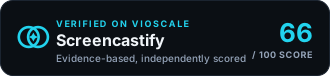
<a href="https://www.vioscale.ai/software/screencastify" target="_blank" rel="noopener">
  <img src="https://www.vioscale.ai/badge/software/screencastify.svg" alt="Screencastify, verified on vioscaleAI" width="330" height="76" loading="lazy" />
</a>
Markdown, for a README →
[](https://www.vioscale.ai/software/screencastify)Claim the profile
Verify you control the domain, then point us at the pages that state the facts about Screencastify and add your own description and media. Free, and it does not change the score.
- Correct anything wrong, with evidence
- Point our crawler at the pages that matter
- Write your own description and add media
Not the owner? How vendor profiles work